Importing Images as Textures
Importing images is a new feature in 0.5.0 where you'll be able to import .png, .jpg, .jpeg, .bmp and .tga images into the game for use with your mods. This allows you to skip the Unreal Editor packaging process entirely if you just want to add item icons for example.
Example Usage
Project Structure
mymod/resources/images/myimage.png

mymod/raw/test.json

Where mymod is the name of your mod and myimage is the name of your image file. Note that when you're importing images, you must place your images within an images folder in the resources folder, otherwise they will be ignored.
You can then reference your image within any TSoftObjectPtr field by entering the following string instead of the usual asset path: $resource/modname/filename.
-
$resource/tells PalSchema that it should look for an imported resource. -
modnameis the name of the mod that imported a resource, in our case it would bemymod. -
filenameis the name of the file inside the resources folder, so since we have amyimage.pngfile, you want it without the extension so it would becomemyimage.
test.json
{
    "DT_PalCharacterIconDataTable": {
        "ChickenPal": {
            "Icon": "$resource/mymod/myimage"
        }
    }
}
Here's the final result:
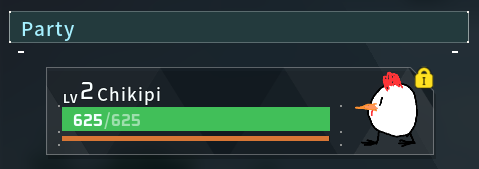
You can utilize this feature for various things like the survival guide, building icons, pal icons, item icons and much more!