Working with Survival Guide
As you may already know, the survival guide is a series of useful tips and tutorials available in-game.
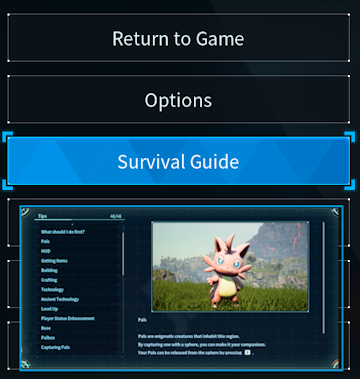
But what if you wanted to add, edit or even delete specific guide entries? Starting with 0.5.0 GungnirIncarnate has implemented support for modifying the Survival Guide!
A Survival Guide JSON has three available fields:
Title: This is the name of the entry that will appear in the Survival Guide.Description: This is the content inside the entry.Texture: This is the image that will show inside the entry just above the title. You can omit this field entirely if you want a pure text guide entry. Texture is aTSoftObjectPtrfield.
Adding Guides
Adding a text only entry
{
  "Example_Help_1": {
    "Title": "PalSchema Entry",
    "Description": "This is an entry made solely using PalSchema :)\r\nThis is another line"
  }
}
Adding an entry with image
{
  "Example_Help_1": {
    "Title": "PalSchema Entry (Image)",
    "Description": "This is an entry made solely using PalSchema :)\r\nThis is another line",
    "Texture": "/Game/Pal/Texture/HelpGuide/T_HelpGuide_3.T_HelpGuide_3"
  }
}
Adding an entry with image using a resource on disk
{
  "Example_Help_1": {
    "Title": "PalSchema Entry (Image Resource)",
    "Description": "This is an entry made solely using PalSchema :)\r\nThis is another line",
    "Texture": "$resource/mymod/mycoverimage"
  }
}
Editing Guides
Same rules apply as when adding guides except you'll want to use the name of an existing guide entry. Below is an example of editing the Game Objective guide entry.
{
  "Help_3": {
    "Title": "Edited PalSchema Entry",
    "Description": "Hello Palworld!"
  }
}
Deleting Guides
Deleting is very simple, you just specify the row as null like so:
{
  "Help_4": null
}